


Overview
This document outlines an AI-powered automation built by Helt Partners to capture, qualify, and distribute positive replies from outbound email campaigns in real time.
The system ensures that high-intent responses are not only identified instantly but also routed, reviewed, and delivered to clients in a structured and monetizable way.
Problem Statement
Helt Partners runs cold email campaigns via Smartlead on behalf of clients. As replies come in, an AI system classifies them into categories such as:
- Positive
- Negative
- Neutral
Positive replies represent high-intent leads and potential revenue opportunities.
However, several operational challenges existed:
1. Response Handling Bottleneck
- Replies required manual review
- Delays reduced momentum with interested prospects
2. Lack of Structured Client Visibility
- Clients needed to see responses
- But raw email threads were unstructured and hard to digest
3. Monetization Constraint
- Contact details of leads were tied to pricing agreements
- Needed controlled exposure of sensitive data
Objective
- Surface positive replies instantly
- Enable fast human validation
- Deliver clean, structured responses to clients
- Control access to lead contact details
- Enable immediate sales action when required
Solution Architecture
A human-in-the-loop automation system built using:
- Smartlead (email campaigns)
- Internal dashboard (review layer)
- Make (automation engine)
- OpenAI (formatting & processing)
- Email delivery system
- Close CRM (optional lead routing)
Dashboard Interface
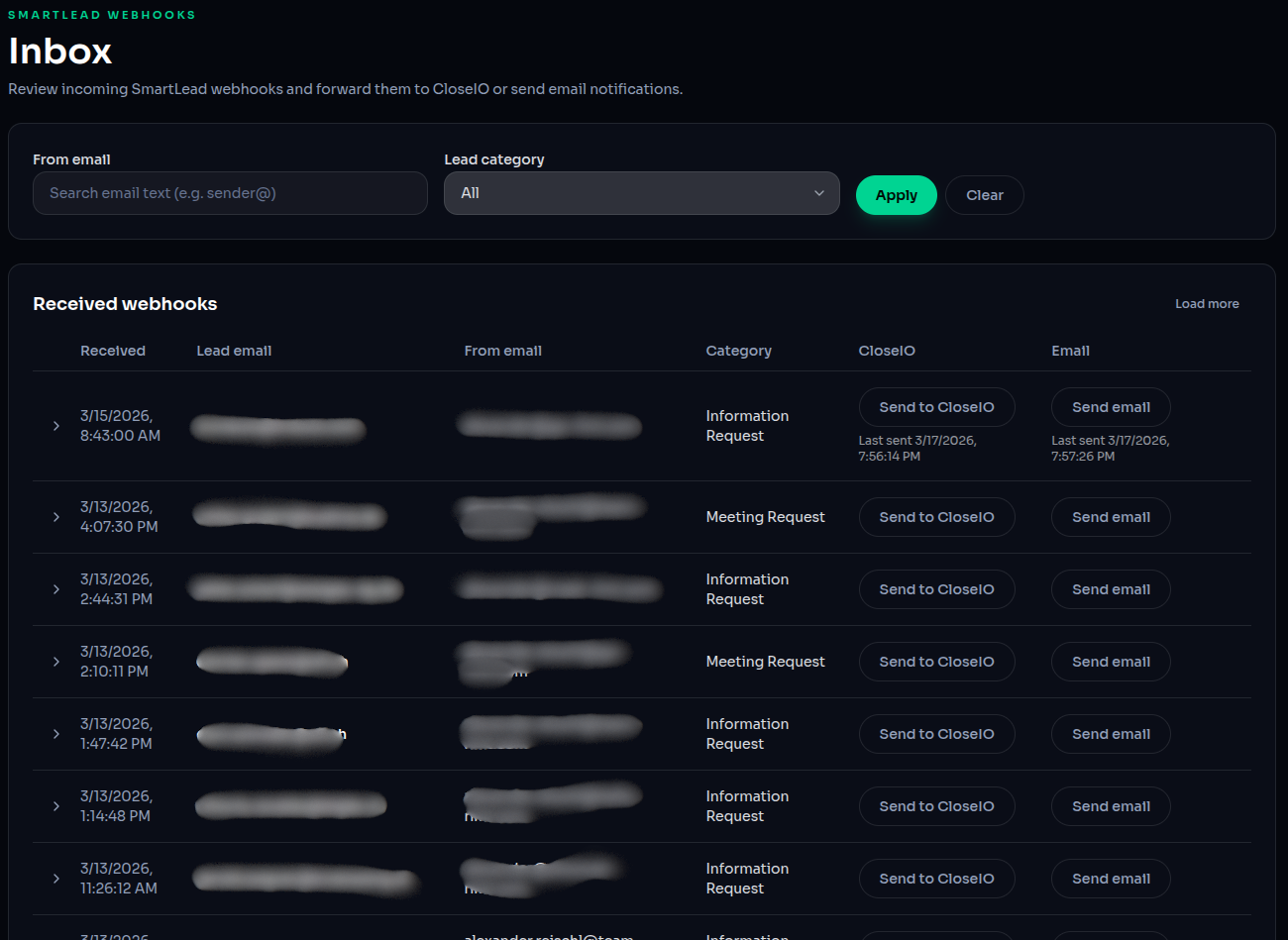
The internal dashboard acts as the control center:
- Displays all incoming replies
- Shows AI-classified categories
- Enables filtering and review
- Provides action buttons:
- Send email to client
- Send to Close CRM
User Interaction Flow
Step 1: Review Positive Reply
A human reviewer evaluates the response inside the dashboard.
Step 2: Trigger Email to Client
Clicking “Send email” opens a modal:
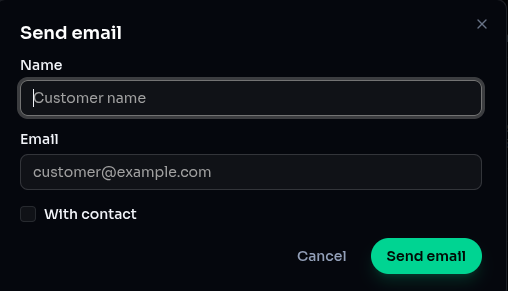
Inputs:
- Customer name
- Customer email
- Option to include or exclude contact details
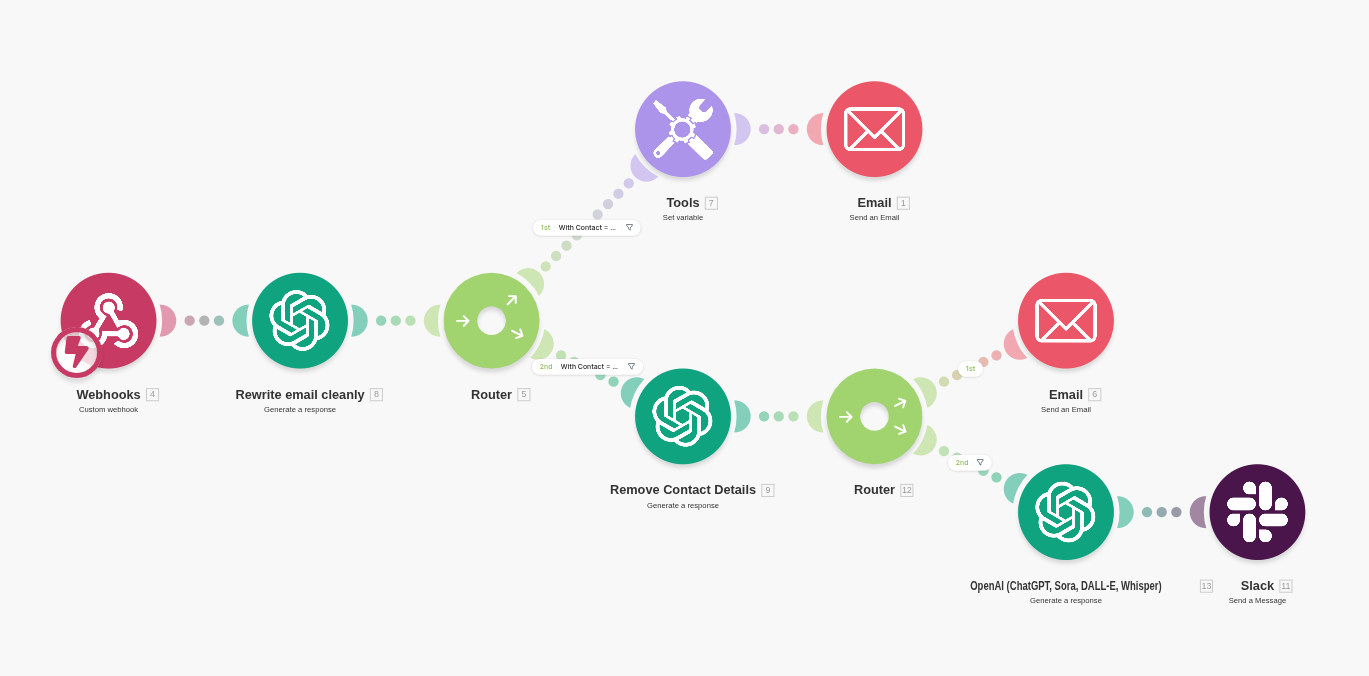
Automation Flow
Step-by-Step Breakdown
1. Webhook Trigger
- Triggered when reviewer confirms sending the email
- Payload includes:
- Original reply content
- Sender details
- Customer details
2. AI Email Rewriting
- ChatGPT reformats the raw email into clean HTML
Why this matters:
- Improves readability
- Creates consistent client-facing communication
3. Conditional Contact Detail Removal
- System removes contact details if required
Logic:
- If client has not paid for lead data → remove details
- If client has paid → include full information
Why this matters:
- Enables flexible pricing model
- Protects valuable lead data
4. Email Delivery
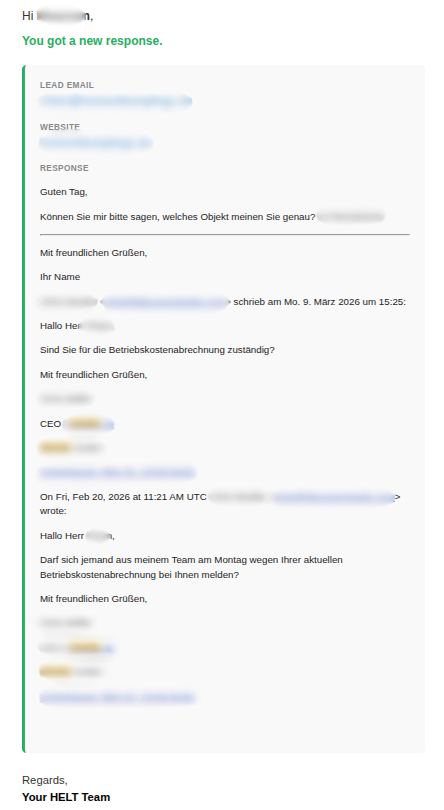
- Final formatted email is sent to the client
Content includes:
- Cleaned response
- Optional contact details
5. Optional CRM Routing
- Reviewer can send the lead to Close CRM
Why this matters:
- Enables immediate follow-up by SDRs
- Removes delay between interest and action
System Logic Summary
- Smartlead receives reply
- AI categorizes response
- Stored in internal dashboard
- Human reviews response
- Reviewer triggers email action
- Webhook activates automation
- Email is reformatted via AI
- Contact data conditionally removed
- Email sent to client
- (Optional) Lead pushed to CRM
Key Design Decisions
Human-in-the-Loop Validation
AI handles classification, but humans make final decisions.
Result:
- Higher accuracy
- Better judgment on edge cases
Controlled Data Exposure
Lead data is not automatically shared.
Result:
- Enables monetization per qualified lead
- Aligns with commercial agreements
AI for Structuring, Not Just Generating
AI is used to improve clarity and presentation of real responses.
Result:
- Professional communication
- Better client experience
Business Impact
This system converts email replies into:
Structured, actionable, and monetizable opportunities
Outcomes
- Faster response handling
- Improved client transparency
- Additional revenue stream (per lead access)
- Faster transition from marketing to sales
Strategic Takeaway
Most outbound systems stop at generating replies.
Helt Partners built a system that:
Captures, qualifies, enhances, and distributes intent in real time
This transforms outbound campaigns from:
Lead generation → Revenue infrastructure